You’re standing at the threshold of affordable astrophotography, but choosing the right uncooled CMOS camera can make or break your results. Budget constraints, frame rates, and sensor sensitivity pull you in different directions. Whether you’re capturing planetary details or wide-field views, you’ll find that these four 2026 standouts each solve specific challenges—though one critical factor might surprise you.
| SVBONY SV105 Telescope Camera USB2.0 Astrophotography | 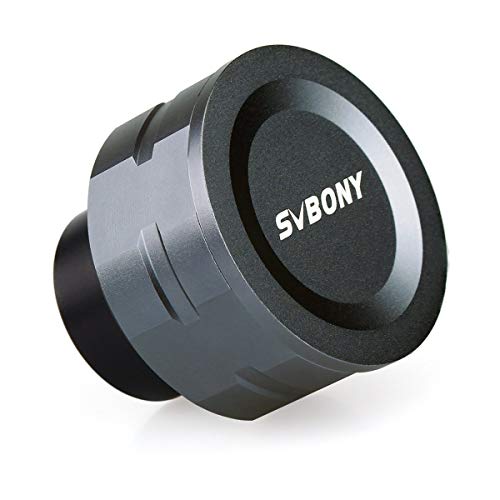 | Beginner-Friendly Entry | Sensor Type: 1/2.8″ IMX307 CMOS | Video Resolution & Frame Rate: 1920×1080 @ 30fps; 2K high-speed video | Optical Interface: Standard 1.25″ eyepiece with M28.5×0.6 threads | CHECK ON AMAZON | Read Our Analysis |
| SVBONY SV305C Astrophotography Telescope Camera 2.1MP |  | Best Value Performance | Sensor Type: 1/2.8″ IMX662 back-illuminated CMOS | Video Resolution & Frame Rate: ROI adjustable; planetary high-speed mode; long exposure mode | Optical Interface: 1.25-inch universal astronomical interface; CS-mount adapter included | CHECK ON AMAZON | Read Our Analysis |
| Celestron NexImage 20 Solar System Camera 20MP |  | Professional Grade | Sensor Type: 20MP AR2020 back-illuminated CMOS | Video Resolution & Frame Rate: 5240×3840; ROI for boosted frame rate | Optical Interface: 1.25-inch nosepiece threads | CHECK ON AMAZON | Read Our Analysis |
| Telescope Camera 4K Astrophotography Electronic Eyepiece |  | Best Budget Pick | Sensor Type: 8MP CMOS | Video Resolution & Frame Rate: 1080P @ 60fps; 4K @ 30fps | Optical Interface: 1.25″ electronic eyepiece with M28.5×0.6 threads | CHECK ON AMAZON | Read Our Analysis |
More Details on Our Top Picks
SVBONY SV105 Telescope Camera USB2.0 Astrophotography
Are you just starting out in astronomical imaging? The SVBONY SV105 offers an accessible entry point with its 1/2.8″ IMX307 CMOS sensor that captures 1920×1080 video at 30fps. You’ll appreciate the plug-and-play setup—no drivers required—and real-time laptop viewing via Sharpcap or AstroDMx software. The camera’s dark light compensation technology enhances clarity when photographing dim lunar details and bright planets. Its standard 1.25″ threaded connection fits most telescopes directly, and you can attach compatible filters for enhanced imaging. At just 10.2 ounces, it’s lightweight and easy to mount. This camera makes quick video recording simple: point and capture.
- Sensor Type:1/2.8″ IMX307 CMOS
- Video Resolution & Frame Rate:1920×1080 @ 30fps; 2K high-speed video
- Optical Interface:Standard 1.25″ eyepiece with M28.5×0.6 threads
- Connectivity & Setup:USB 2.0; plug and play; no drivers required
- Primary Imaging Targets:Lunar, planetary, bright objects, terrestrial
- Weight & Portability:10.2 ounces
- Additional Feature:Dark light compensation technology
- Additional Feature:30 fps at 1920×1080
- Additional Feature:Telescope filter compatible
SVBONY SV305C Astrophotography Telescope Camera 2.1MP
The SVBONY SV305C stands out as an excellent entry-level choice if you’re pursuing planetary and lunar photography without the complexity of cooled systems. Its IMX662 sensor delivers 2.1MP resolution with 2.9 μm pixels and impressive back-illuminated sensitivity, particularly in red wavelengths. You’ll appreciate the 128 MB buffer that prevents frame loss during USB interrupts, while planetary high-speed mode and sky-space long exposure options in SharpCap give you flexibility. The HCG noise reduction activates automatically at higher gains, and ROI functionality lets you capture custom resolutions while maintaining frame rates. With its 1.25-inch interface compatibility and removable protective glass, you’re getting robust capability for EAA enthusiasts.
- Sensor Type:1/2.8″ IMX662 back-illuminated CMOS
- Video Resolution & Frame Rate:ROI adjustable; planetary high-speed mode; long exposure mode
- Optical Interface:1.25-inch universal astronomical interface; CS-mount adapter included
- Connectivity & Setup:Built-in 128MB DDR III buffer; SharpCap compatible
- Primary Imaging Targets:Planetary, lunar, Electronically-Assisted Astronomy (EAA)
- Weight & Portability:12.6 ounces
- Additional Feature:128 MB DDR III buffer
- Additional Feature:Automatic HCG noise reduction
- Additional Feature:Arbitrary ROI resolution function
Celestron NexImage 20 Solar System Camera 20MP
If you’re seeking a dedicated planetary imager that doesn’t require cooling systems or complex power management, Celestron’s NexImage 20 stands out as an exceptional choice. This 20MP camera captures stunning detail of Jupiter’s storms, Saturn’s rings, and lunar craters with its back-illuminated CMOS sensor and 1.4-micron pixels. You’ll appreciate the USB-C connectivity for fast, reliable transfers and the included iCap software for complete control over gain, exposure, and frame rate. The ROI feature lets you crop framing to boost performance and reduce file sizes during stacking sessions. Whether you’re a beginner or advanced astrophotographer, this compact imager delivers high-resolution planetary imagery with minimal setup hassle.
- Sensor Type:20MP AR2020 back-illuminated CMOS
- Video Resolution & Frame Rate:5240×3840; ROI for boosted frame rate
- Optical Interface:1.25-inch nosepiece threads
- Connectivity & Setup:USB-C; iCap software included; plug and play
- Primary Imaging Targets:Moon, planets, Sun (with filter); Solar System focused
- Weight & Portability:14.4 ounces
- Additional Feature:Built-in autoguiding support
- Additional Feature:2-Year US Warranty
- Additional Feature:1.4 micron pixels
Telescope Camera 4K Astrophotography Electronic Eyepiece
Looking to capture stunning planetary details and lunar imagery without breaking the bank? The Telescope Camera 4K Astrophotography Electronic Eyepiece delivers professional-grade performance in a lightweight package. This 8MP camera fits seamlessly into your 1.25″ focuser, offering 4K video at 30fps and 1080P at 60fps for smooth planetary capture. Its IR-cut filter reduces light pollution while protecting your sensor. You’ll appreciate the plug-and-play USB connectivity—no drivers needed across Windows, macOS, or Linux. At just 110 grams, the CNC-machined aluminum body won’t burden your telescope. Whether you’re imaging Saturn’s rings or exploring deep-sky objects, this versatile tool integrates perfectly with astronomy software for advanced processing.
- Sensor Type:8MP CMOS
- Video Resolution & Frame Rate:1080P @ 60fps; 4K @ 30fps
- Optical Interface:1.25″ electronic eyepiece with M28.5×0.6 threads
- Connectivity & Setup:USB; plug and play; no drivers required; Windows/macOS/Linux compatible
- Primary Imaging Targets:Lunar craters, planetary video, nebulae, galaxies
- Weight & Portability:9.9 ounces (110g); ultralight aerospace design
- Additional Feature:IR-cut filter included
- Additional Feature:CNC-machined aluminum body
- Additional Feature:4K video capability
Factors to Consider When Choosing an Uncooled CMOS Camera for Entry-Level Astrophotography
When you’re selecting an uncooled CMOS camera for entry-level astrophotography, you’ll want to evaluate your sensor size and resolution against your telescope’s capabilities and your software’s compatibility across different platforms. You should also verify the USB connectivity standards and optical interface requirements to ensure seamless integration with your existing equipment. Finally, you’ll need to assess the frame rate performance capabilities to determine whether the camera can capture the detail you’re seeking in deep-sky imaging.
Sensor Size and Resolution
Two critical specifications define an uncooled CMOS camera’s performance in entry-level astrophotography: sensor size and resolution. You’ll find most entry-level models feature 1/2.8-inch sensors, balancing photon collection with compact form factors. Larger sensors within this range gather more light and reduce noise during short planetary exposures, revealing faint details you’d otherwise miss.
Resolution matters, but only strategically. Higher megapixel counts don’t automatically improve image quality; they help reduce per-pixel noise only when your exposure times generate sufficient signal-to-noise ratio. Pixel size proves equally important—larger pixels boost sensitivity and dynamic range in low-light conditions by offsetting fixed readout noise inherent to uncooled designs.
If your camera offers ROI capability, you can crop to smaller areas and achieve faster frame rates for high-speed imaging, effectively compensating for limited overall resolution.
USB Connectivity Standards
While sensor specifications determine what your camera can capture, the USB connectivity standard you choose affects how efficiently you’ll transfer and view that data. USB-C with USB 3.0/3.1 support provides superior bandwidth for live view and high-frame-rate video compared to USB 2.0 connections, reducing lag and enabling smoother real-time monitoring during observations.
Your choice also impacts driver requirements and compatibility across Windows, macOS, and Linux systems. Many modern cameras offer dual connectivity—USB-C for contemporary hosts alongside USB-A adapters for legacy equipment—maximizing flexibility with your existing setup.
Don’t overlook data transfer reliability either. Higher-speed USB standards combined with robust buffer mechanisms minimize frame loss during rapid captures, crucial for beginner astrophotography when you’re still perfecting technique.
Software Compatibility Across Platforms
How well your camera integrates with your computer depends heavily on software compatibility—a factor that can make or break your astrophotography workflow. You’ll find that many entry-level CMOS cameras work plug-and-play with dedicated software like SharpCap on Windows or AstroDMx Capture on Linux, eliminating driver installation hassles. Some models support cross-platform operation across Windows, macOS, and Linux, though iOS compatibility remains limited. You should verify whether your chosen camera requires drivers, as driverless options simplify setup considerably. Manufacturers typically provide recommended capture apps tailored to each operating system, ensuring consistent performance of features like real-time viewing and frame rate control. This manufacturer support directly influences your camera’s usability across your devices and workflow efficiency.
Optical Interface Requirements
Once you’ve confirmed software compatibility, you’ll need to verify that your camera’s optical interface matches your telescope setup. Standard 1.25-inch eyepiece compatibility ensures you can attach the camera to most telescopes and accessories without adapters. If your scope uses different connections, look for cameras offering CS/C-mount adapters as alternatives.
Check that threading—typically M28.5×0.6mm—properly couples your camera to focusers and filter wheels. A detachable protective glass and IR-cut/UV-cut filters will affect light transmission and spectral response, so consider whether you need these features for your observing goals.
Back-illuminated sensors with 2–3 μm pixels deliver optimal results when paired with appropriate focal ratios, preserving coupling efficiency and sampling quality. Verifying these optical specifications prevents costly compatibility issues down the road.
Frame Rate Performance Capabilities
After confirming your camera’s physical compatibility with your telescope, you’ll want to assess its frame rate performance—a specification that directly impacts your ability to capture fast-moving celestial objects like planets and the Moon. USB 2.0 cameras typically max out around 30 fps at full 1080p, though many offer specialized high-speed modes for planetary imaging. You can dramatically increase effective frame rates using Region-of-Interest (ROI) cropping, which reads only a smaller sensor portion without increasing bandwidth demands. Higher gain settings may be necessary to maintain proper exposure at faster speeds, so evaluate your camera’s noise performance alongside frame rate specs. Built-in image buffers prevent frame loss during USB bus contention, ensuring continuous capture at peak speeds.
Noise Reduction Technology Features
What separates a usable astrophotography image from one buried in thermal and readout noise? Your camera’s noise reduction technology. You’ll want to prioritize cameras with automatic High Gain (HCG) modes that suppress readout noise at elevated gain settings—critical for capturing dim targets without sacrificing signal quality.
Look for back-illuminated sensors with smaller pixel pitches like 2.9 μm, which boost quantum efficiency and naturally lower noise impact. Built-in firmware processing and image buffers protect against frame drops and noise artifacts during USB transfers, especially during high-speed planetary sessions.
Don’t overlook bit-depth specifications either. Cameras offering 12 or 14-bit pipelines preserve faint details better than 8-bit alternatives, preventing noise amplification during post-processing adjustments.
Budget-Friendly Entry Point
How do you balance performance with cost when stepping into astrophotography? You’ll want to prioritize cameras with 1.25″ eyepiece interfaces that work seamlessly with beginner telescopes you likely already own. Look for models offering plug-and-play operation with widely supported software like SharpCap or AstroDMx Capture—you’ll avoid expensive driver purchases and steep learning curves.
Seek sensors featuring smaller pixel sizes and back-illuminated designs that excel in low-light conditions. ROI and binning modes prove invaluable for planetary imaging, boosting frame rates without requiring additional hardware investments. Built-in IR-cut filtering provides practical value without inflating costs.
You don’t need active cooling on budget uncooled CMOS cameras. Instead, rely on short exposures and intelligent processing to manage noise effectively. This approach delivers solid image quality while keeping your initial investment manageable.
Planetary Versus Deep-Sky Imaging
The choice between planetary and deep-sky imaging fundamentally shapes which uncooled CMOS camera will serve you best. For planetary work, you’ll want high frame rates—30 fps at 1080p or better—to freeze atmospheric turbulence with short exposures. Prioritize high gain and low readout noise to reveal fine planetary detail. Deep-sky imaging demands different priorities: longer exposures, stacking capability, and improved sensitivity for faint extended objects. Look for cameras offering ROI functionality and fast readout speeds to minimize data loss during extended sessions. Sensor type matters too; narrowband or color sensors enhance planetary color accuracy, while deep-sky work benefits from superior NIR sensitivity and larger full-well capacity. Consider your primary target before selecting your camera.
Frequently Asked Questions
How Do Uncooled CMOS Cameras Compare to Cooled CCD Cameras for Deep-Sky Astrophotography?
You’ll find that cooled CCDs still capture deeper sky objects with less noise, but uncooled CMOS cameras offer you faster readout speeds, better live-view capability, and lower costs while delivering impressive results for most deep-sky work.
What Is the Typical Lifespan and Warranty Coverage for Uncooled CMOS Astrophotography Cameras?
You’ll typically find uncooled CMOS cameras lasting 5-10 years with standard 1-2 year manufacturer warranties. You can extend coverage through optional plans, though you’re responsible for proper maintenance to preserve longevity.
Can Uncooled CMOS Cameras Capture Reliable Planetary Images in Humid or Coastal Environments?
You’ll struggle capturing reliable planetary images in humid or coastal environments with uncooled CMOS cameras. Salt spray corrodes electronics, while moisture degrades image quality and causes internal condensation, reducing your camera’s performance considerably.
What Software Compatibility and Post-Processing Requirements Exist for Uncooled CMOS Camera Data?
You’ll need compatible software like SharpCap, N.I.N.A., or Sequence Generator Pro. You’ll require post-processing tools for noise reduction, flat-fielding, and color correction. Most uncooled CMOS cameras use standard formats you’ll easily manage with Astro Pixel Processor or Pixinsight.
How Does Sensor Size Affect Light-Gathering Capability and Field of View in Astrophotography?
You’ll gather more light with larger sensors since they capture photons across a bigger area. Conversely, you’ll achieve a wider field of view with smaller sensors when using identical focal length lenses.